Operations
The Step-by-Step AI Automation Guide for Small Teams (Without Hiring a Developer)
Overwhelmed by where to start with AI automation? This is the exact process we use to find and fix the biggest bottleneck in any small team's operations.
The Step-by-Step AI Automation Guide for Small Teams (Without Hiring a Developer)
You know your team is drowning in manual work. So you Google "how to automate my business."
Two hours later, you have 47 tabs open. You are staring at articles about APIs, custom code, and complex integrations.
You feel more overwhelmed and confused than when you started. It feels like you need to hire a full-time developer just to send an automatic email.
You are worried about breaking the few systems that actually work right now. So, you close the tabs and go back to doing it manually.
You Cannot Automate a Mess
Take a deep breath. Automation does not start with buying expensive software.
It starts with a simple process audit. You cannot automate a mess.
If you try to put AI on top of a broken process, you just get a faster broken process. You will scale your mistakes instead of your revenue.
In our experience, the technology is rarely the actual problem. The problem is that the business owner has never documented what their team does all day.
Before you write a single line of code, you have to map the work. You need to understand exactly how data moves through your company.
The 4-Step Process
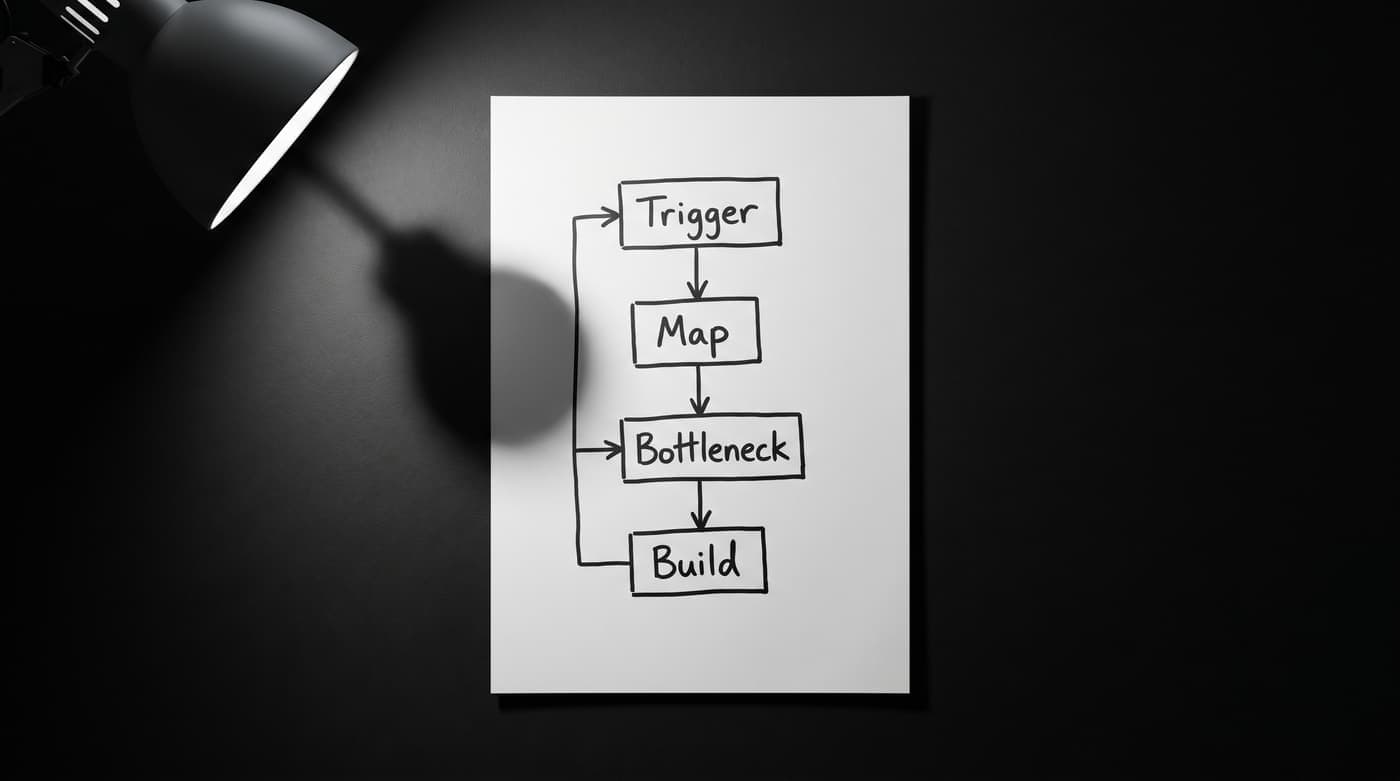
We use a very specific framework when we audit new clients.
It strips away the technical noise entirely.
It focuses purely on your business logic. Here is exactly how we do it.
Step 1: Identify the Trigger
Every process starts somewhere. It is the action that creates the work.
What is the single event that kicks off the manual labor? It might be a new client signing a contract. It might be an invoice going past due.
Pinpoint the exact moment the clock starts ticking. This is your trigger.
Step 2: Map the Current Manual Steps
Write down everything a human does after that trigger fires.
Be painfully honest. Do they download a PDF? Do they open a spreadsheet? Do they copy an email address and paste it into a CRM?
Write down every single click. Do not skip steps because they seem obvious.
The machine needs to know exactly how the data moves from point A to point B. If a human has to make a decision, write that down too.
Step 3: Find the Bottleneck
Look closely at your list of manual steps. Where does the process get stuck?
Usually, it is the step that requires a human to remember to do something. Or it is the step where someone has to copy data between two tools that do not talk to each other.
That is your bottleneck. That is what is killing your team's momentum. It is the exact spot where errors happen and speed drops to zero.
Step 4: Build Only What Removes It
Do not try to automate your entire business at once. That leads to failure and endless frustration.
Focus entirely on building the specific bridge that bypasses that one bottleneck. Keep the scope small and highly focused.
Fix the leak, then move on to the next problem.
Real World Example: Invoice Reminders
Let's look at how this works in practice. We will apply it to a process every small team hates.
Chasing unpaid invoices is a perfect candidate for automation. It is repetitive, predictable, and requires zero creativity.
The Trigger The trigger is simple. An invoice hits 3 days past due in your accounting software. That is the moment the work is created.
The Manual Steps Your operations manager runs a report every Friday afternoon to find late payments.
They open their email client. They copy the client's address from the CRM.
They type out a polite reminder, attach the PDF invoice, and hit send.
The Bottleneck The operations manager is busy with actual client work. They forget to run the report on Friday.
They run it next Tuesday instead. The reminder goes out four days late. Cash flow slows down.
The Build A custom workflow watches your accounting software 24/7. When an invoice is 3 days late, it automatically drafts a polite reminder email.
It pulls the correct contact info and attaches the correct PDF. It never forgets, and it never gets busy.
Using a human-in-the-loop design, it does not send the email blindly. It saves the draft in a specific folder.
Your manager just reviews it, clicks approve, and hits send. The AI does the heavy lifting, but the human stays in control.
The "I Need a Developer" Myth
When small teams see workflows like this, they assume they need a developer on payroll.
You don't. The audit is the hard part. The build is the easy part.
Most high-impact automations for small teams take 1 to 2 weeks to build, not months. They do not require a massive IT department.
You need an expert to build it once, correctly, and hand you the keys. You don't need to keep them on staff forever paying a six-figure salary.
Having a clear process is what separates teams that automate successfully from those who waste months in trial and error. It keeps you focused on solving problems, not hiring staff.
The Power of Self-Hosted Systems
Many teams try to build these flows themselves using consumer platforms like Zapier.
That works well for your first ten tasks. But Zapier charges per task. As your business grows, those monthly fees explode rapidly.
You end up being punished financially for scaling your business.
We build on self-hosted infrastructure. You own the system entirely.
There are no per-task limits. Your costs stay around $50 a month for the raw private server space.
You stay in control of your data, your systems, and your operating budget.
Fix Your Bottlenecks Today
Stop letting manual tasks drag your team down and steal your focus. You do not have to figure this out alone.
If you are ready to stop drowning in tabs, check out our automation examples. You will see exactly how these workflows function for real companies.
Book a free AI consultation with our experts today. We will walk you through this exact audit process and find your biggest bottleneck together.